
ایجاد جدول بوت استرپ bootstrap table
اموزش چگونگی و نحوه ساخت جدول table در بوت استرپ bootstrap را یادخواهیم گرفت.
مقالات
جدول پایه بوت استرپ
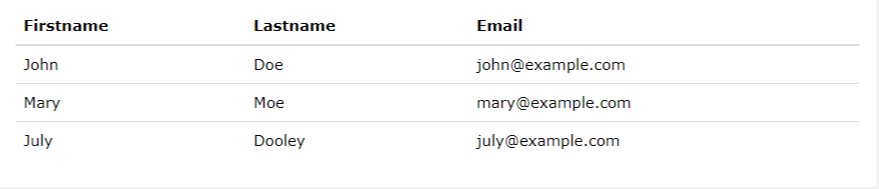
یک جدول پایه بوت استرپ دارای یک پد نور و تنها دارای تقسیم بندی افقی است.
کلاس .table ویژگی را اضافه می کند:
یک ظاهر پایه به یک جدول:
مثال
|
1 2 3 4 5 6 7 8 9 10 11 12 13 14 15 16 17 18 19 20 21 22 23 24 25 26 27 28 29 30 |
<div class="container"> <h2>Basic Table</h2> <p>The .table class adds basic styling (light padding and only horizontal dividers) to a table:</p> <table class="table"> <thead> <tr> <th>Firstname</th> <th>Lastname</th> <th>Email</th> </tr> </thead> <tbody> <tr> <td>John</td> <td>Doe</td> <td>john@example.com</td> </tr> <tr> <td>Mary</td> <td>Moe</td> <td>mary@example.com</td> </tr> <tr> <td>July</td> <td>Dooley</td> <td>july@example.com</td> </tr> </tbody> </table> </div> |
ردیف های راه راه
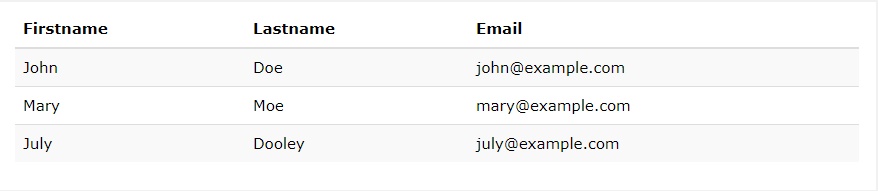
کلاس .table-striped نوار جبری را به یک جدول اضافه می کند:
مثال
|
1 2 3 4 5 6 7 8 9 10 11 12 13 14 15 16 17 18 19 20 21 22 23 24 25 26 27 28 29 30 |
<div class="container"> <h2>Striped Rows</h2> <p>The .table-striped class adds zebra-stripes to a table:</p> <table class="table table-striped"> <thead> <tr> <th>Firstname</th> <th>Lastname</th> <th>Email</th> </tr> </thead> <tbody> <tr> <td>John</td> <td>Doe</td> <td>john@example.com</td> </tr> <tr> <td>Mary</td> <td>Moe</td> <td>mary@example.com</td> </tr> <tr> <td>July</td> <td>Dooley</td> <td>july@example.com</td> </tr> </tbody> </table> </div> |
جدول مرزی
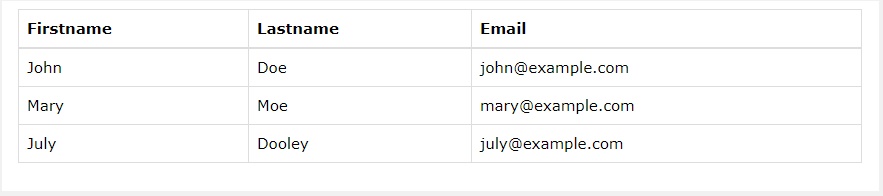
کلاس Striped Rows .table-bordered ویژگی را می افزاید:
Border را در تمام قسمت های جدول و سلول ها اضافه می کند:
|
1 2 3 4 5 6 7 8 9 10 11 12 13 14 15 16 17 18 19 20 21 22 23 24 25 26 27 28 29 30 |
<div class="container"> <h2>Bordered Table</h2> <p>The .table-bordered class adds borders to a table:</p> <table class="table table-bordered"> <thead> <tr> <th>Firstname</th> <th>Lastname</th> <th>Email</th> </tr> </thead> <tbody> <tr> <td>John</td> <td>Doe</td> <td>john@example.com</td> </tr> <tr> <td>Mary</td> <td>Moe</td> <td>mary@example.com</td> </tr> <tr> <td>July</td> <td>Dooley</td> <td>july@example.com</td> </tr> </tbody> </table> </div> |
ردیفهای شناور
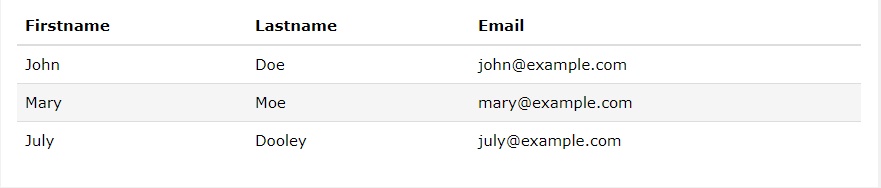
کلاس Hover Rows در بوت استرپ .table-hover ویژگی را اضافع می کند:
یک اثر شناور (رنگ پس زمینه خاکستری) روی ردیف های جدول ایجاد می کند:
|
1 2 3 4 5 6 7 8 9 10 11 12 13 14 15 16 17 18 19 20 21 22 23 24 25 26 27 28 29 30 |
<div class="container"> <h2>Hover Rows</h2> <p>The .table-hover class enables a hover state on table rows:</p> <table class="table table-hover"> <thead> <tr> <th>Firstname</th> <th>Lastname</th> <th>Email</th> </tr> </thead> <tbody> <tr> <td>John</td> <td>Doe</td> <td>john@example.com</td> </tr> <tr> <td>Mary</td> <td>Moe</td> <td>mary@example.com</td> </tr> <tr> <td>July</td> <td>Dooley</td> <td>july@example.com</td> </tr> </tbody> </table> </div> |
جدول Condensed
جدول Condensed در بوت استرپ
کلاس های متراکم تبدیل با استفاده از برش سطوح سلولی در نیمه یک جدول را کم می کند.

|
1 2 3 4 5 6 7 8 9 10 11 12 13 14 15 16 17 18 19 20 21 22 23 24 25 26 27 28 29 30 |
<div class="container"> <h2>Condensed Table</h2> <p>The .table-condensed class makes a table more compact by cutting cell padding in half:</p> <table class="table table-condensed"> <thead> <tr> <th>Firstname</th> <th>Lastname</th> <th>Email</th> </tr> </thead> <tbody> <tr> <td>John</td> <td>Doe</td> <td>john@example.com</td> </tr> <tr> <td>Mary</td> <td>Moe</td> <td>mary@example.com</td> </tr> <tr> <td>July</td> <td>Dooley</td> <td>july@example.com</td> </tr> </tbody> </table> </div> |
کلاسهای متنی
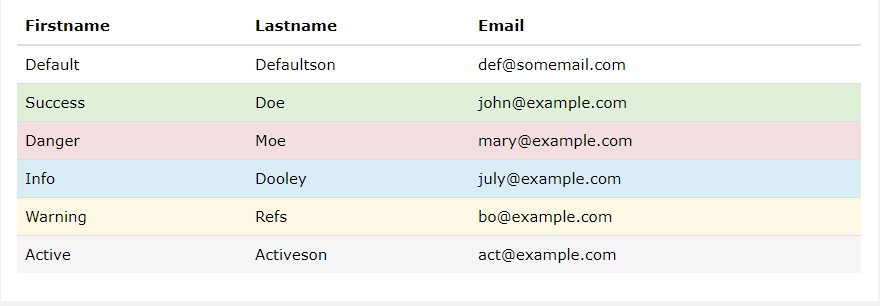
کلاس Contextual در بوت استرپ
کلاس های متنی را می توان برای رنگ ردیف های جدول ( <tr> ) یا سلول های جدول ( <td> ) استفاده کرد:
مثال
|
1 2 3 4 5 6 7 8 9 10 11 12 13 14 15 16 17 18 19 20 21 22 23 24 25 26 27 28 29 30 31 32 33 34 35 36 37 38 39 40 41 42 43 44 45 |
<div class="container"> <h2>Contextual Classes</h2> <p>Contextual classes can be used to color table rows or table cells. The classes that can be used are: .active, .success, .info, .warning, and .danger.</p> <table class="table"> <thead> <tr> <th>Firstname</th> <th>Lastname</th> <th>Email</th> </tr> </thead> <tbody> <tr> <td>Default</td> <td>Defaultson</td> <td>def@somemail.com</td> </tr> <tr class="success"> <td>Success</td> <td>Doe</td> <td>john@example.com</td> </tr> <tr class="danger"> <td>Danger</td> <td>Moe</td> <td>mary@example.com</td> </tr> <tr class="info"> <td>Info</td> <td>Dooley</td> <td>july@example.com</td> </tr> <tr class="warning"> <td>Warning</td> <td>Refs</td> <td>bo@example.com</td> </tr> <tr class="active"> <td>Active</td> <td>Activeson</td> <td>act@example.com</td> </tr> </tbody> </table> </div> |
کلاس های متنی که می توانند مورد استفاده قرار گیرند عبارتند از:
کلاس شرح
.active رنگ مربوط به ستون جدول یا سلول جدول را اعمال می کند
.success یک عمل مثبت یا مثبت نشان می دهد
.info –
.warning نشان دهنده یک هشدار است که ممکن است نیاز به توجه داشته باشد
.danger یک اقدام خطرناک یا بالقوه منفی نشان می دهد
جداول ریسپانسیو
کلاس .table-responsive یک جدول ریسپانسیو responsive یا واکنشگرا ایجاد می کند. سپس جدول روی دستگاه های کوچک (زیر 768 پیکسل) به صورت افقی نمایش میدهد و با زمانی که اندازه صفحه بزرگتر از 768 پیکسل است فرقی نمی کند.
در مرحله قبل با تایپوگرافی بوت استرپ اشنا شدید.
|
1 2 3 4 5 6 7 8 9 10 11 12 13 14 15 16 17 18 19 20 21 22 23 24 25 26 27 28 |
<div class="container"> <h2>Table</h2> <p>The .table-responsive class creates a responsive table which will scroll horizontally on small devices (under 768px). When viewing on anything larger than 768px wide, there is no difference:</p> <div class="table-responsive"> <table class="table"> <thead> <tr> <th>#</th> <th>Firstname</th> <th>Lastname</th> <th>Age</th> <th>City</th> <th>Country</th> </tr> </thead> <tbody> <tr> <td>1</td> <td>Anna</td> <td>Pitt</td> <td>35</td> <td>New York</td> <td>USA</td> </tr> </tbody> </table> </div> </div> |
مطالب زیر را حتما مطالعه کنید

افزونه و کلاس Carousel در بوت استرپ bootstrap
کلاس collapse در بوت استرپ bootstrap

کلاس jumbotron در بوت استرپ
فیلترهای بوت استرپ
افزونه Affix بوت استرپ
دیدگاهتان را بنویسید